Kanban Development
Ngôn ngữ • Language
- VI
- EN
Kanban Development – Quản lý dòng chảy công việc bằng Kanban board
Kanban (看板) là một từ tiếng Nhật, nghĩa là “signboard” (bảng tín hiệu/bảng trực quan).
Trong Agile, Kanban method giúp bạn quản lý công việc bằng cách visualize workflow, limit WIP, và manage flow.
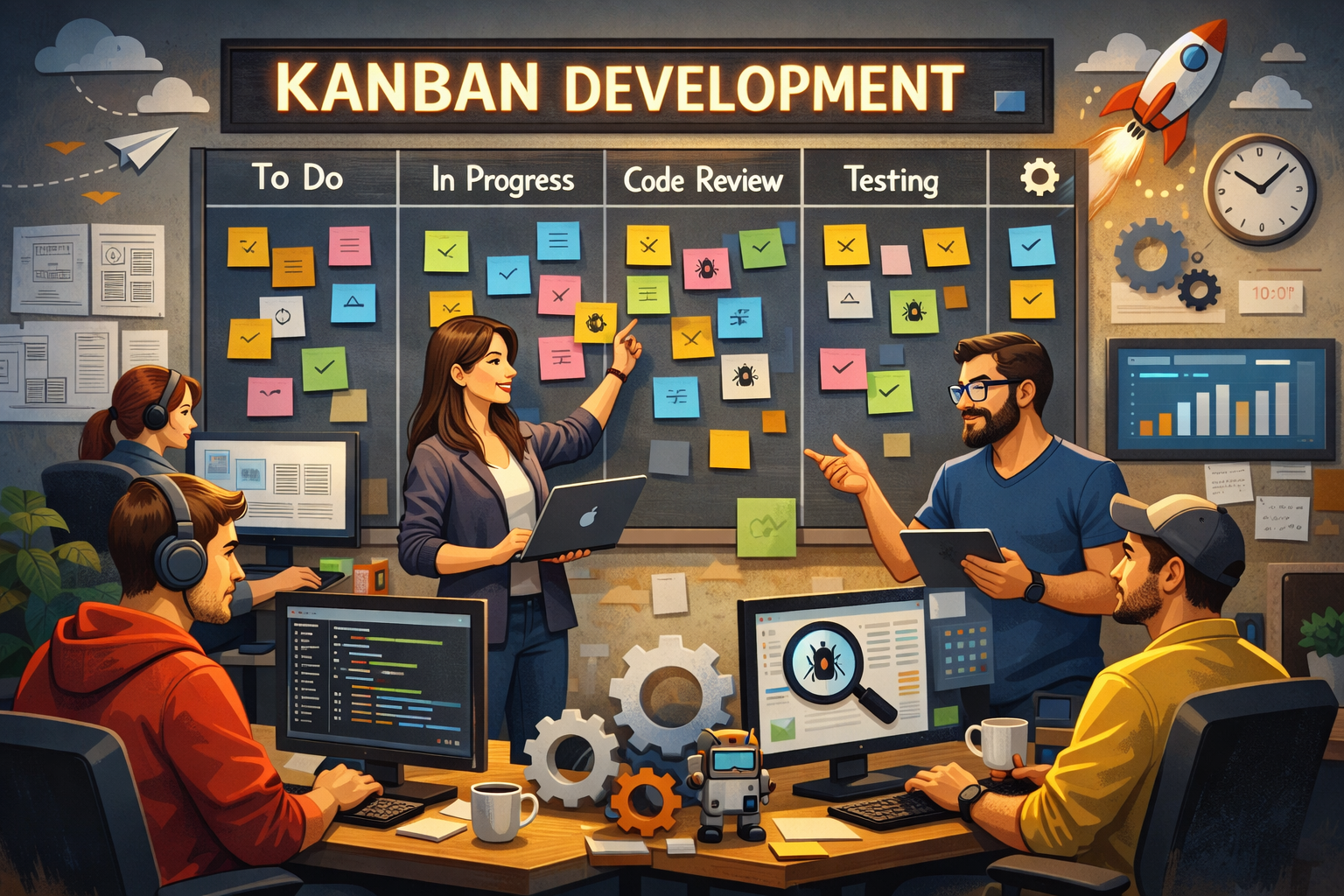
Kanban giúp “nhìn thấy công việc” và điều phối theo năng lực thật của hệ thống: visualize workflow → limit WIP → manage flow.
TL;DR – Kanban Development trong 1 phút
- Kanban (signboard) bắt nguồn từ tư duy Lean/Toyota, dùng bảng trực quan để quản lý dòng chảy công việc.
- Kanban board thường có các cột: To Do / Items → In Progress → Testing → Done.
- Điểm “ăn tiền” nhất: WIP limits (Work in Progress) — giới hạn số việc đang làm để giảm task switching và tăng Done.
- Kanban là một Information Radiator (bộ “tỏa thông tin”): nhìn vào là biết việc nào Done, việc nào đang làm, việc nào bị tắc.
- PMI-ACP hay hỏi: pull system, flow metrics (lead time/cycle time/throughput), bottleneck, và cách cải tiến dựa trên dữ liệu.
Kanban thường đi kèm Lean: nếu bạn vừa học bài Lean Software Development, Kanban là “cách làm” giúp bạn triển khai flow và WIP trong thực tế.
Gợi ý đọc: Lean Software Development
1) Kanban Development là gì?
Kanban Development (trong bối cảnh Agile/PMI-ACP) là cách dùng Kanban method để:
- Visualize workflow (trực quan hóa quy trình)
- Limit WIP (Work in Progress) (giới hạn việc đang làm)
- Manage flow (quản lý dòng chảy công việc)
- Make policies explicit (làm rõ “luật chơi”/tiêu chí chuyển cột)
- Dùng feedback loops để cải tiến liên tục
Nói đơn giản: Kanban giúp bạn nhìn thấy công việc và điều phối theo năng lực thật của team/hệ thống để ra “Done” đều hơn.
2) Kanban đến từ đâu? (Toyota/Lean)
Kanban là từ tiếng Nhật nghĩa là signboard — một “bảng tín hiệu” để điều phối công việc.
Trong lịch sử, Kanban gắn với Toyota Production System (TPS) và tư duy Lean, nơi mục tiêu là:
- Giảm lãng phí (waste)
- Tối ưu dòng chảy (flow)
- Tránh “ôm quá nhiều việc cùng lúc” gây tắc nghẽn
Hãy nhớ: Lean thiên về principles/mindset (tối ưu value + flow), còn Kanban là phương pháp rất thực dụng để triển khai flow bằng board, WIP limits, metrics.
3) Kanban board: nhìn là hiểu “việc đang ở đâu”
Một Kanban board cơ bản thường có các cột như sau:
- Items / To Do: việc cần làm (có thể rất nhiều)
- In Progress: việc đang thực hiện
- Testing: việc đang kiểm thử/xác nhận
- Done: việc hoàn tất
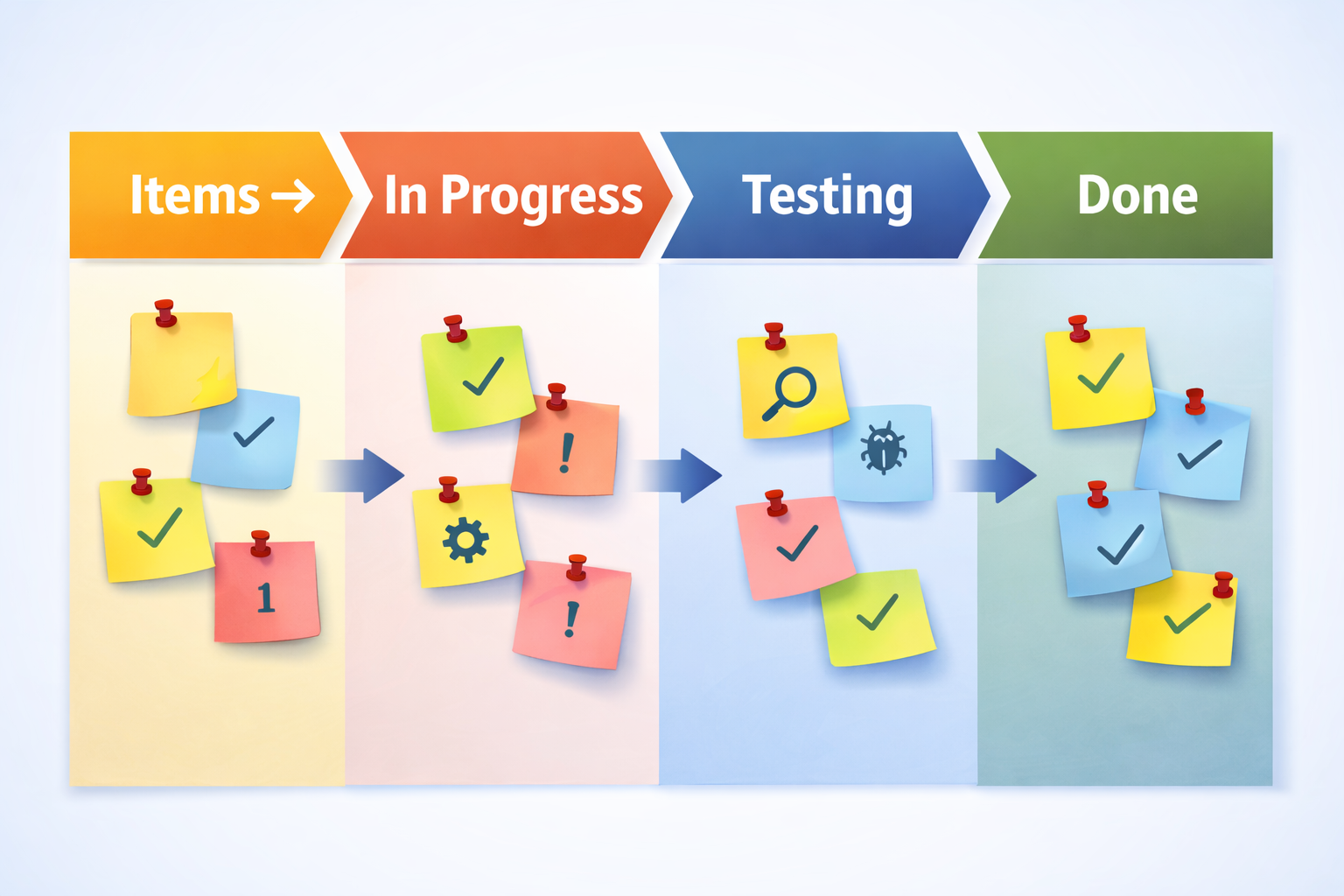
Ví dụ flow cơ bản: Items/To Do → In Progress → Testing → Done. (Bạn có thể tăng số cột để phản ánh quy trình thật.)
Lưu ý PMI: Nhìn bề ngoài, thẻ công việc “đi” từ trái sang phải giống như bị “đẩy” qua các cột.
Nhưng nguyên tắc vận hành đúng của Kanban là pull system: chỉ “kéo” thêm việc khi còn capacity và khi WIP cho phép.
4) “Low-tech, high-touch”: bảng trắng + sticky notes (và khi nào dùng phần mềm)
Nhiều team thích Kanban theo kiểu low-tech, high-touch:
- Một cái bảng trắng (whiteboard)
- Kẻ cột
- Dán sticky notes
Ưu điểm: dễ nhìn, dễ cập nhật, tạo thói quen “đi qua bảng là thấy việc”.
Tuy nhiên, PMI-ACP cũng nhìn thực tế:
- Nếu team làm việc cùng địa điểm (co-located) → board vật lý rất hiệu quả.
- Nếu team phân tán/remote → board số (Jira/Trello/Azure DevOps…) là lựa chọn hợp lý, miễn là vẫn giữ đúng “Kanban behaviors”: WIP limits, policies, metrics, feedback loops.
5) WIP limits (Work in Progress) – điểm mạnh nhất của Kanban
Điều mình thường nhấn mạnh khi học Kanban: nếu làm Kanban mà không limit WIP thì bạn bỏ lỡ lợi ích lớn nhất.
Vì sao?
- Khi không giới hạn, team dễ “mở quá nhiều việc” → task switching tăng → ít việc về Done.
- WIP cao làm bottleneck khó lộ diện: nhìn đâu cũng bận, nhưng không biết tắc ở khâu nào.
Ví dụ đời thường:
- Hai thợ sơn phải sơn 100 phòng. Nếu bắt họ “sơn cả 100 phòng cùng lúc”, họ sẽ chạy qua chạy lại, mỗi phòng làm một ít → chẳng phòng nào xong nhanh.
- Nếu giới hạn “chỉ sơn tối đa 2 phòng cùng lúc” → tập trung hoàn tất → Done nhanh hơn.
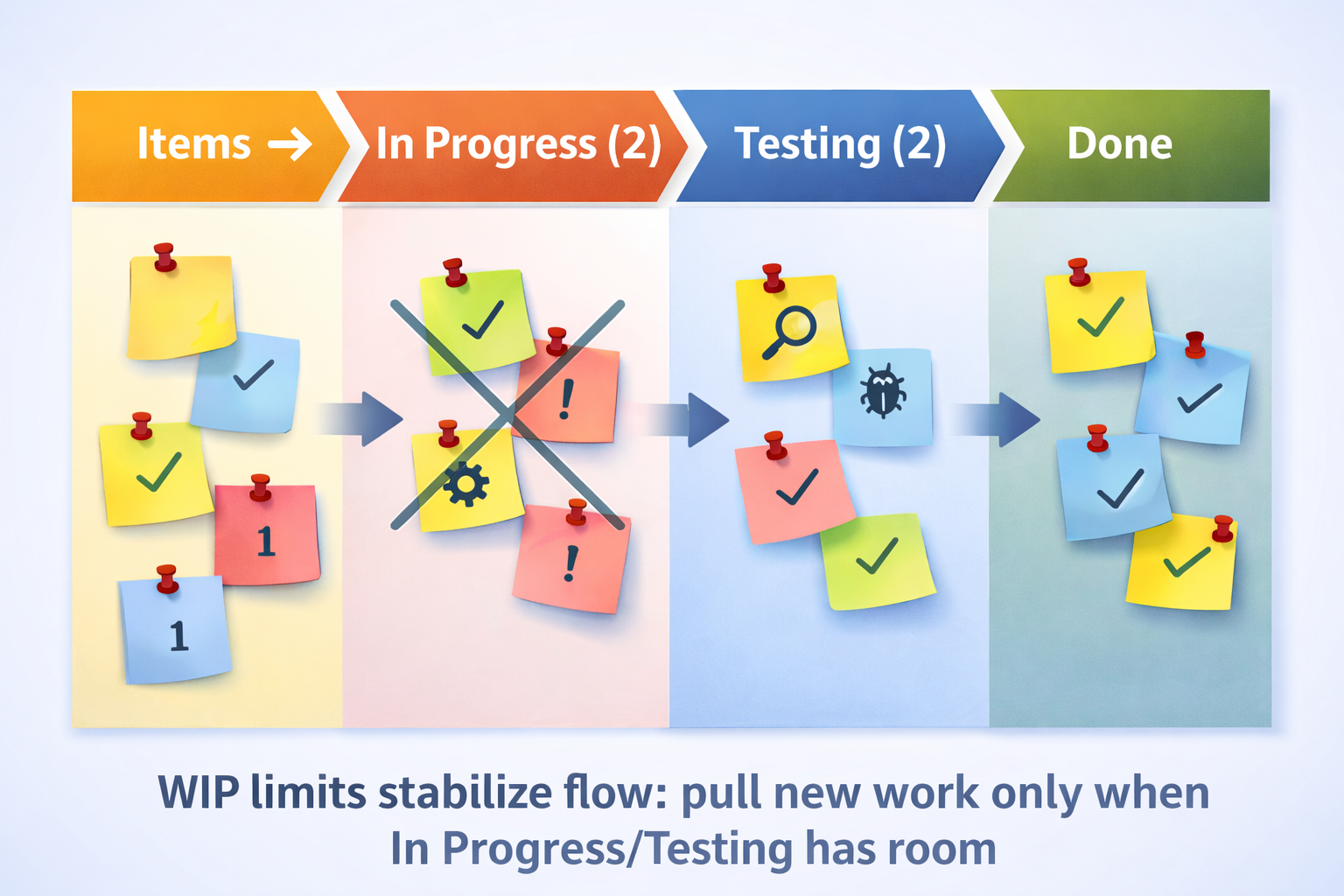
WIP limits là “phanh an toàn” giúp flow ổn định: chỉ kéo việc mới khi In Progress/Testing còn chỗ.
6) Kanban là “Information Radiator” (Bộ tỏa thông tin)
Trong Agile, Kanban board thường được gọi là Information Radiator.
Bạn bước vào phòng, nhìn bảng là biết ngay:
- Cái gì đã Done
- Cái gì đang In Progress
- Cái gì đang Testing
- Cột nào “phình ra” (bottleneck)
Tức là thông tin được “tỏa ra” ngay lập tức, không cần hỏi quá nhiều.
7) “Core practices” theo PMI/Kanban: làm đúng bản chất, không chỉ là “kẻ cột”
Để Kanban vận hành đúng (PMI-friendly), bạn cần các thực hành cốt lõi sau:
-
Visualize workflow
Làm rõ các bước thật của công việc (từ yêu cầu tới khi bàn giao). -
Limit WIP
Giới hạn việc đang làm để giảm context switching và tăng Done. -
Manage flow
Theo dõi công việc “chảy” qua hệ thống: chậm ở đâu, vì sao chậm, cải tiến gì. -
Make policies explicit
“Luật chuyển cột” phải rõ: điều kiện nào để thẻ được move từ In Progress → Testing → Done (thường gắn với Definition of Done (DoD)). -
Feedback loops & cải tiến
Dùng review/retro/service delivery review, thử nghiệm nhỏ, đo lại bằng dữ liệu.
8) Flow metrics (PMI hay hỏi): lead time, cycle time, throughput
Kanban rất “hợp đề thi” vì nó đi với metrics rõ ràng:
- Lead time: từ lúc yêu cầu được ghi nhận/commit tới lúc delivered.
- Cycle time: từ lúc bắt đầu làm tới lúc done.
- Throughput: số item done trong một khoảng thời gian.
- “Khách đợi quá lâu” → nghĩ lead time và bottleneck/queue.
- “Vào làm rồi mà làm mãi không xong” → nghĩ cycle time và trở ngại trong quy trình.
- “Muốn lead time giảm” → ưu tiên giảm WIP + xử bottleneck (flow tốt lên).
9) Scrum + Kanban: Scrumban (rất hay gặp ngoài đời)
Nhiều team dùng Scrum (Sprint, events) nhưng theo dõi tiến độ bằng Kanban board. Cách kết hợp phổ biến gọi là Scrumban.
- Scrum giúp bạn có nhịp (cadence): Sprint Planning, Review, Retro.
- Kanban giúp bạn quản lý flow: WIP limits, bottleneck visibility, flow metrics.
Điểm mấu chốt: dù bạn gọi tên gì, hãy giữ “hành vi” đúng: pull, WIP limits, policies, và đo bằng flow metrics.
10) Exam tips & traps – bẫy Kanban trong PMI-ACP
- Chỉ “kẻ cột” nhưng không có WIP limits → flow vẫn tắc, Done vẫn ít.
- Thấy tắc nghẽn nhưng lại “đẩy thêm việc cho mọi người bận” → WIP tăng, lead time tăng.
- Không có policies explicit (tiêu chí chuyển cột mơ hồ) → tranh cãi, handoff nhiều, chậm cải tiến.
- Chỉ đo “bận/không bận” mà không đo lead time/cycle time/throughput → khó cải tiến dựa trên dữ liệu.
- Nhầm Kanban là “timeboxed” bắt buộc như Scrum → Kanban thường tối ưu cho continuous flow (dòng chảy liên tục).
11) Mini scenarios (PMI-style): nhìn board → chọn hành động đúng
Scenario 1: “Ai cũng bận nhưng ít Done”
Board có rất nhiều thẻ ở In Progress, cột Done tăng chậm.
- Nguyên nhân thường gặp: WIP quá cao, task switching.
- Hành động Kanban tốt: đặt/siết WIP limits, ưu tiên “finish work”, swarm để kéo thẻ về Done.
- Đo lại: throughput tăng đều, cycle time giảm.
Scenario 2: “Dev xong nhanh nhưng khách nhận rất chậm”
Thẻ nằm lâu ở Testing hoặc chờ release.
- Nguyên nhân: bottleneck/handoff/waiting ở khâu sau.
- Hành động tốt: manage flow end-to-end, làm rõ policy, tự động hóa test/release, giảm batch size.
- Đo đúng: lead time phản ánh đúng “khách đợi bao lâu”.
Scenario 3: “Team tranh cãi liên tục: khi nào được move sang Done?”
Có người nói “xong rồi”, có người bảo “chưa đạt”.
- Nguyên nhân: thiếu make policies explicit và/hoặc Definition of Done (DoD).
- Hành động tốt: thống nhất policy/DoD, làm rõ điều kiện chuyển cột, giảm handoff và rework.
12) Checklist học nhanh
Checklist – Kanban Development (VI)
Mini-mock – Kanban Development
- Kanban method: visualize workflow • limit WIP • manage flow • make policies explicit • feedback loops.
- PMI hay hỏi: pull system, bottleneck, WIP limits, và lead time/cycle time/throughput.
- Ưu tiên hành động: giảm WIP + xử bottleneck để flow mượt và Done đều.
Kanban Development – Managing work flow with a Kanban board
Kanban is a Japanese word meaning “signboard”.
In Agile, the Kanban method helps you manage work by visualizing workflow, limiting WIP, and managing flow.
Kanban makes work visible and improves flow: visualize workflow → limit WIP → manage flow.
TL;DR – Kanban Development in 1 minute
- Kanban (signboard) is strongly connected to Lean/Toyota thinking and uses a visual board to manage work flow.
- A basic board often looks like: Items/To Do → In Progress → Testing → Done.
- The biggest benefit: WIP limits (Work in Progress) — fewer simultaneous tasks → less context switching → more Done.
- Kanban is an Information Radiator: one glance shows what’s done, what’s stuck, and where the bottleneck is.
- PMI-ACP often tests: pull system, flow metrics (lead time/cycle time/throughput), bottlenecks, and data-driven improvement.
Kanban often complements Lean: it’s a practical method to implement flow and WIP in day-to-day delivery.
Suggested reading: Lean Software Development
1) What is Kanban Development?
In PMI-ACP / Agile contexts, Kanban Development means applying the Kanban method to:
- Visualize workflow
- Limit WIP (Work in Progress)
- Manage flow
- Make policies explicit
- Use feedback loops for continuous improvement
In plain terms: Kanban makes work visible and helps the team finish more by working on less at a time.
2) Where does Kanban come from? (Toyota/Lean)
Kanban means signboard in Japanese.
Historically, it’s associated with Toyota Production System (TPS) and Lean thinking, focusing on:
- reducing waste
- optimizing flow
- avoiding overload caused by too much work-in-progress
3) The Kanban board: see the work “at a glance”
A basic Kanban board often uses columns such as:
- Items / To Do
- In Progress
- Testing
- Done
A simple flow: Items/To Do → In Progress → Testing → Done. (Real teams may add more columns to match reality.)
PMI note: Visually, cards move left-to-right and it can look like a “push.”
But the core operational idea is a pull system: pull new work only when capacity exists and WIP allows it.
4) “Low-tech, high-touch”: whiteboard + sticky notes (and when software is fine)
Many teams love low-tech, high-touch Kanban:
- a whiteboard
- columns drawn with markers
- sticky notes
It’s fast, visible, and encourages daily interaction.
Practically:
- If you’re co-located, physical boards are great.
- If you’re distributed/remote, digital boards are fine as long as you keep Kanban behaviors: WIP limits, explicit policies, flow metrics, and feedback loops.
5) WIP limits (Work in Progress) – the biggest Kanban benefit
If you use Kanban but ignore WIP limits, you miss its biggest value.
Why?
- Too much WIP increases context switching.
- High WIP hides bottlenecks (“everyone is busy” but little gets finished).
Simple analogy:
- Two painters can’t paint 100 rooms at once. If they try, they’ll touch each room a little and finish none quickly.
- Limiting them to “2 rooms at a time” increases completion rate.
WIP limits stabilize flow: pull new work only when In Progress/Testing has room.
6) Kanban as an “Information Radiator”
A Kanban board is often called an Information Radiator:
- you instantly see what’s Done
- what’s in progress
- what’s blocked
- where the bottleneck is (the “bulging” column)
7) PMI-aligned core practices: more than “drawing columns”
To run Kanban properly (PMI-friendly), keep these practices:
- Visualize workflow
- Limit WIP
- Manage flow
- Make policies explicit (often tied to Definition of Done (DoD))
- Feedback loops + continuous improvement
8) Flow metrics (often tested): lead time, cycle time, throughput
Kanban pairs naturally with metrics:
- Lead time: request/commit to delivery
- Cycle time: start to done
- Throughput: done items per time period
- “Customer waits too long” → focus on lead time and queues/bottlenecks.
- “Once started, it takes forever” → focus on cycle time and internal blockers.
- To reduce lead time → reduce WIP and fix bottlenecks first.
9) Scrum + Kanban: Scrumban (common in real teams)
Many Scrum teams track work on a Kanban board (often called Scrumban):
- Scrum provides cadence (planning/review/retro).
- Kanban improves flow (WIP limits, bottleneck visibility, flow metrics).
The key is behavior: pull, WIP limits, explicit policies, and metrics.
10) Exam tips & traps – Kanban in PMI-ACP
- Drawing columns without WIP limits → flow still breaks, Done stays low.
- Pushing more work so everyone is “busy” → WIP up, lead time up.
- No explicit policies (unclear move criteria) → handoffs, rework, and slower improvement.
- No flow metrics (lead/cycle/throughput) → improvement becomes guesswork.
- Assuming Kanban must be timeboxed like Scrum → Kanban often supports continuous flow.
11) Mini scenarios (PMI-style): read the board → choose the right move
Scenario 1: “Busy, but little Done”
Many cards sit in In Progress, while Done grows slowly.
- Likely cause: high WIP, context switching.
- Best move: set/tighten WIP limits, swarm to finish, focus on Done.
- Validate: throughput increases, cycle time decreases.
Scenario 2: “Dev is fast, customers still wait”
Cards get stuck in Testing or release queues.
- Cause: downstream bottleneck, waiting, handoffs.
- Best move: manage end-to-end flow, automate testing/release, reduce batch size, clarify policies.
- Measure: lead time reflects the customer waiting time.
Scenario 3: “Constant arguments: when can we move to Done?”
People disagree on what “done” means.
- Cause: missing policies explicit and/or Definition of Done (DoD).
- Best move: define DoD and move criteria clearly to reduce rework and confusion.
12) Checklist & practice
Checklist – Kanban Development (EN)
Mini-mock – Kanban Development
- Kanban method: visualize workflow • limit WIP • manage flow • make policies explicit • feedback loops.
- PMI often tests: pull system, bottlenecks, WIP limits, and lead time/cycle time/throughput.
- Best first moves in many scenarios: reduce WIP and remove bottlenecks to improve flow and steady Done.